|
|
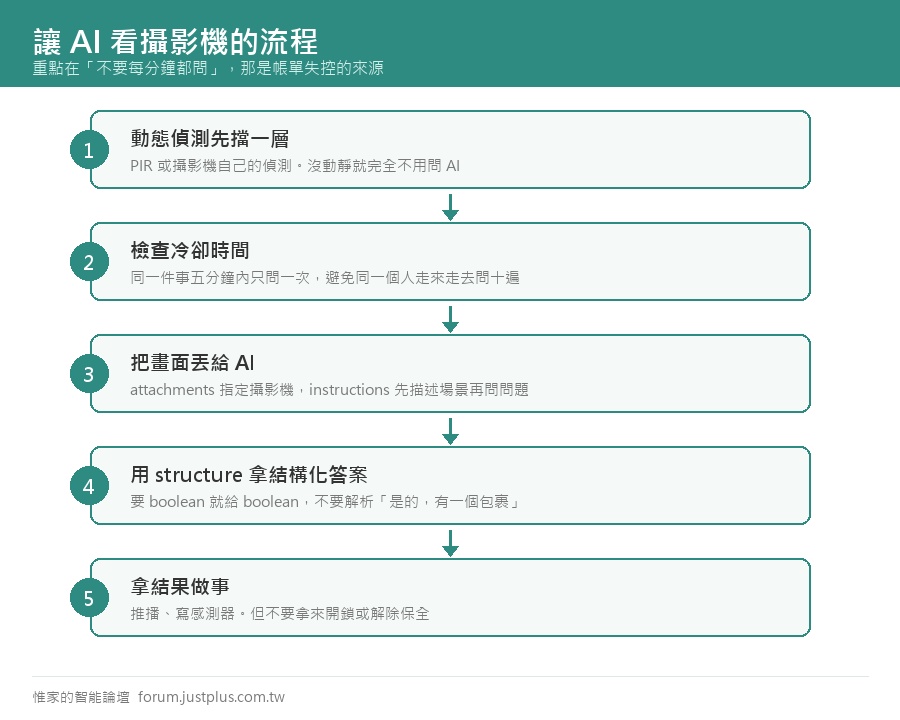
傳統的動態偵測分不出是人、是貓、還是樹葉在動。把畫面丟給 AI 問「這是什麼」,準確度差很多。
Home Assistant 的 AI Task 可以直接吃攝影機畫面,不用裝額外的東西。
官方的範例:數院子裡有幾隻鳥
這是官方文件原文,用的是「模板實體」——每五分鐘自己跑一次,結果存成感測器:
- template:
- - triggers:
- - trigger: homeassistant
- event: start
- - trigger: time_pattern
- minutes: "/5"
- actions:
- - action: ai_task.generate_data
- data:
- task_name: "{{ this.entity_id }}"
- instructions: >-
- This is the inside of my goose coop. How many birds (chickens, geese, and
- ducks) are inside the coop?
- structure:
- birds:
- selector:
- number:
- attachments:
- media_content_id: media-source://camera/camera.chicken_coop
- media_content_type: image/jpeg
- response_variable: result
- sensor:
- - name: "Chickens"
- state: "{{ result.data.birds }}"
- state_class: total
三個關鍵點
- attachments —— 指定要看哪支攝影機。media_content_id 的格式固定是 media-source://camera/ 加上實體 ID
- structure 用 number —— 拿回來直接是數字,可以存成感測器、可以比大小
- time_pattern 每五分鐘 —— 不是即時,是定期看一次
改成你自己的用途
把 instructions 換掉就好。幾個實際可用的問法:
- 包裹:門口有沒有包裹或紙箱?只回答 yes 或 no
- 車位:這個停車場有幾個空位?只回答數字
- 垃圾:垃圾桶已經推到路邊了嗎?只回答 yes 或 no
- 人或動物:畫面裡的是人、貓、狗,還是沒有生物?只回答一個詞
|
|

 加入惟家 LINE 群


 窺視卡
窺視卡 雷達卡
雷達卡


 發表於
發表於 
 提升卡
提升卡 置頂卡
置頂卡 沉默卡
沉默卡 喧囂卡
喧囂卡 變色卡
變色卡 千斤頂
千斤頂 照妖鏡
照妖鏡