|
|
如果你看過的教學說「Google 常式沒辦法做條件判斷、沒辦法等待」,那份教學已經過期了。Google Home 現在有一個叫「腳本編輯器」的東西,會寫條件、會延遲、會用溫度當判斷依據。分工的那條線因此整個移動過。
這篇會做完三件事:把新的分界線講清楚、把 Google 那一側實際寫一次、把 HA 這一側的橋接做起來並驗證。
先搞清楚 Google 那邊有兩套東西
很多人混在一起講,所以先分開:
- 常式(Routine) —— Google Home App 裡點選單建的那種。「說某句話 → 做幾件事」。介面友善,但只能排一串動作
- 腳本編輯器(script editor) —— 同一個 App 裡的進階入口,用 YAML 寫。這裡才有條件判斷與延遲
「Google 常式做不到條件判斷」這句話,講的是第一種。第二種做得到。
腳本編輯器實際長什麼樣
這是官方範例的原樣,貼進去就能跑(裝置名稱要換成你自己的):
- metadata:
- name: Synchronize two lights
- description: If one light is turned on, turn the other on.
- automations:
- - starters:
- - type: device.state.OnOff
- device: Light A - Office
- state: on
- is: true
- condition:
- type: device.state.OnOff
- device: Light B - Living Room
- state: on
- is: false
- actions:
- - type: device.command.OnOff
- devices:
- - Light B - Living Room
- on: true
看三個地方:`starters`(什麼事情發生時啟動)、`condition`(還要滿足什麼才做)、`actions`(做什麼)。`condition` 就是 if。
延遲也有,是一個動作型別:
- metadata:
- name: Smoke detector lights
- description: When smoke is detected, flash lights red then off.
- automations:
- - starters:
- - type: device.state.SensorState
- device: Smoke Detector - Kitchen
- state: currentSensorStateData.SmokeLevel.currentSensorState
- is: high
- actions:
- - type: device.command.ColorAbsolute
- devices:
- - Light - Living Room
- color:
- name: "red"
- - type: time.delay
- for: 5sec
- - type: device.command.OnOff
- devices: Light - Living Room
- on: false
`time.delay` 就是「等一下再做下一件事」。
裝置怎麼引用:官方的寫法是「裝置名 - 房間名」,例如 `Light - Living Room`。名字要跟 Google Home App 裡顯示的一字不差,包含中間那個前後有空格的減號。名字打錯時編輯器會在存檔那一刻用紅字標出來,不會讓你存進去 —— 這是它少數會當場告訴你錯了的地方。
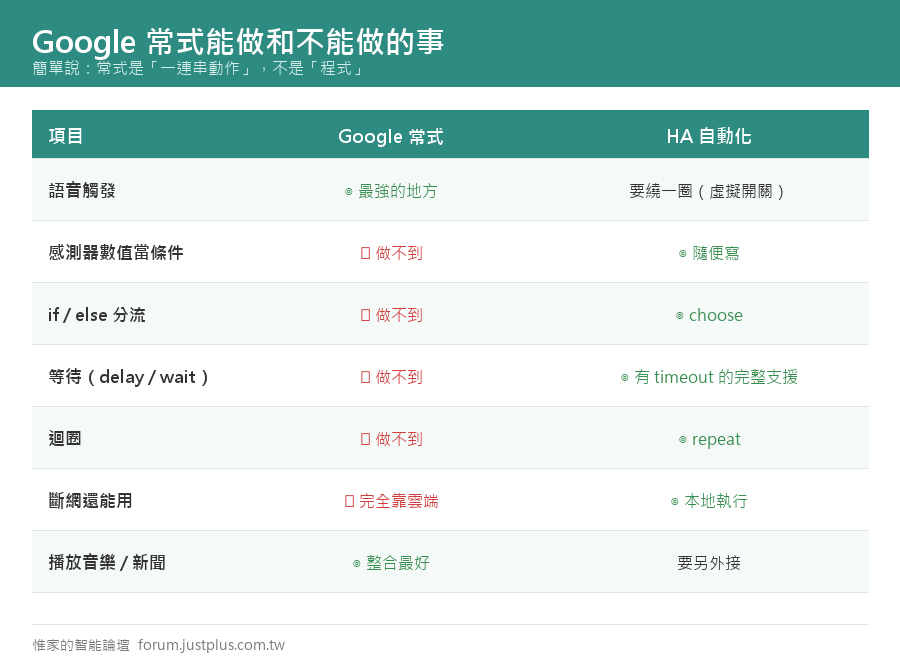
所以「做不到」的清單要重寫
刪掉三項,留下四項,而留下來的這四項才是真正決定分工的:
|
|

 加入惟家 LINE 群


 窺視卡
 雷達卡


 發表於 2026-9-21 11:19:08

 提升卡
 置頂卡
 沉默卡
 喧囂卡
 變色卡
 千斤頂
 照妖鏡