找回密碼
 立即註冊
惟家LINE群QRCODE
    查看: 5|回覆: 0

    用智慧家庭改善睡眠:從睡前到起床的完整設計

    [複製鏈接]

    !lvup!   100%

    363

    主題

    27

    回帖

    2200萬

    積分

    管理員

    積分
    22005752
    發表於 3 天前 | 顯示全部樓層 |閱讀模式
    睡眠品質是智慧家庭最有價值、但最少人做的應用。


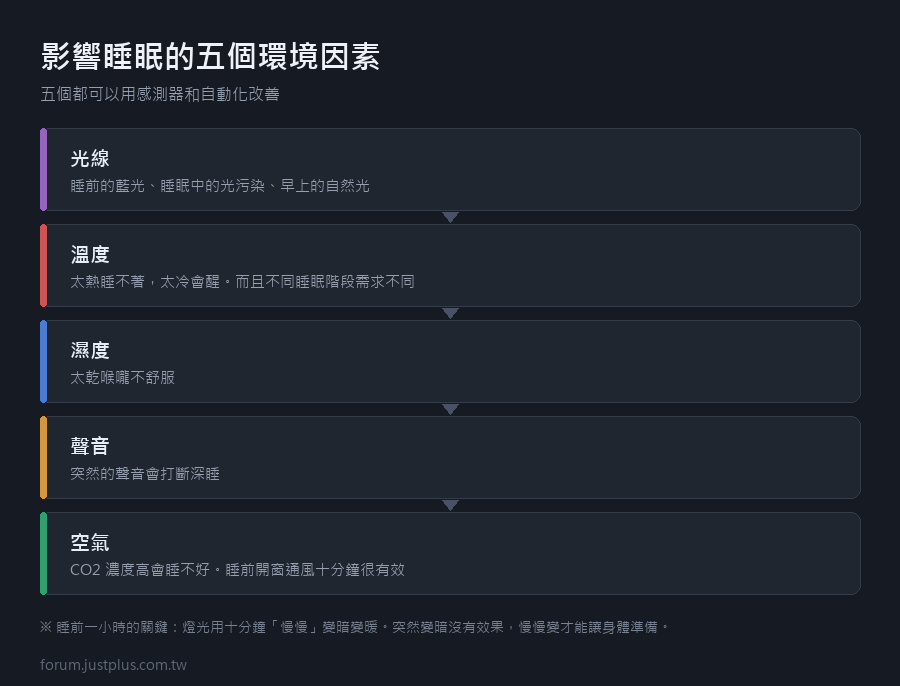
    影響睡眠的五個環境因素


    • 光線 —— 睡前的藍光、睡眠中的光污染、早上的自然光
    • 溫度 —— 太熱睡不著,太冷會醒
    • 濕度 —— 太乾喉嚨不舒服
    • 聲音 —— 突然的聲音會打斷深睡
    • 空氣 —— CO2 濃度高會睡不好


    這五個都可以用感測器和自動化改善。

    睡前一小時:降低刺激
    1. automation:
    2.   - alias: 睡前準備
    3.     triggers:
    4.       - trigger: time
    5.         at: "22:00:00"
    6.     conditions:
    7.       - condition: state
    8.         entity_id: binary_sensor.有人在家
    9.         state: "on"
    10.     actions:
    11.       # 1. 燈光轉暖轉暗(慢慢來)
    12.       - action: light.turn_on
    13.         target:
    14.           entity_id: all
    15.         data:
    16.           color_temp_kelvin: 2200
    17.           brightness_pct: 30
    18.           transition: 600      # 十分鐘慢慢變
    19.       # 2. 臥室先降溫(睡眠需要體溫下降)
    20.       - action: climate.set_temperature
    21.         target:
    22.           entity_id: climate.主臥
    23.         data:
    24.           temperature: 25
    25.           hvac_mode: cool
    26.       # 3. 如果 CO2 偏高,提醒開窗
    27.       - if:
    28.           - condition: numeric_state
    29.             entity_id: sensor.主臥CO2
    30.             above: 900
    31.         then:
    32.           - action: script.通知
    33.             data:
    34.               等級: 一般
    35.               標題: 臥室空氣悶
    36.               訊息: >
    37.                 CO2 {{ states('sensor.主臥CO2') }} ppm,
    38.                 睡前開窗通風十分鐘
    複製代碼

    「十分鐘慢慢變暗」是重點 ——
    突然變暗沒有效果,慢慢變才能讓身體準備。


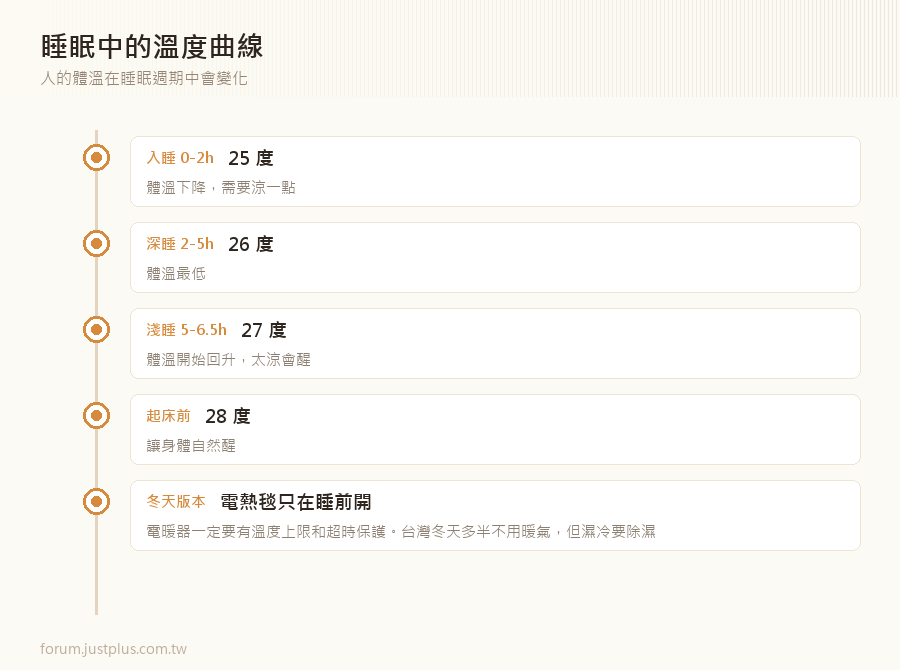
    睡眠中的溫度曲線

    人的體溫在睡眠週期中會變化


    • 入睡時體溫下降 → 需要涼一點
    • 深睡期體溫最低 → 可以再涼一點
    • 接近起床時體溫回升 → 太涼會醒


    實際的設定
    1. script:
    2.   睡眠溫度曲線:
    3.     mode: restart
    4.     sequence:
    5.       # 入睡階段(0-2 小時)
    6.       - action: climate.set_temperature
    7.         target:
    8.           entity_id: climate.主臥
    9.         data:
    10.           temperature: 25
    11.       - delay: "02:00:00"
    12.       # 深睡階段(2-5 小時)
    13.       - action: climate.set_temperature
    14.         target:
    15.           entity_id: climate.主臥
    16.         data:
    17.           temperature: 26
    18.       - delay: "03:00:00"
    19.       # 淺睡到起床(5 小時後)
    20.       - action: climate.set_temperature
    21.         target:
    22.           entity_id: climate.主臥
    23.         data:
    24.           temperature: 27
    25.       - delay: "01:30:00"
    26.       # 起床前升溫(讓身體自然醒)
    27.       - action: climate.set_temperature
    28.         target:
    29.           entity_id: climate.主臥
    30.         data:
    31.           temperature: 28
    複製代碼

    這比冷氣自己的「睡眠模式」可控太多
    而且你可以用實際的睡眠資料調整。

    冬天的版本


    • 電暖器要小心 —— 一定要有溫度上限和超時保護
    • 電熱毯只在睡前開,睡著後關
    • 台灣大部分地區冬天不用暖氣,但濕冷要除濕


    睡眠中的光線管理

    完全黑暗是最好的


    • 所有有 LED 指示燈的東西用黑膠帶貼起來
    • 電動窗簾一定要關
    • 夜燈用 2000K 以下,亮度 3% 以下


    自動化
    1. automation:
    2.   - alias: 睡覺時關掉所有指示燈
    3.     triggers:
    4.       - trigger: state
    5.         entity_id: input_select.家庭狀態
    6.         to: 睡覺
    7.     actions:
    8.       # 有些裝置的 LED 可以關
    9.       - action: switch.turn_off
    10.         target:
    11.           entity_id:
    12.             - switch.路由器指示燈
    13.             - switch.電視指示燈
    14.         continue_on_error: true
    15.       # 窗簾關好
    16.       - action: cover.close_cover
    17.         target:
    18.           entity_id: cover.主臥窗簾
    複製代碼


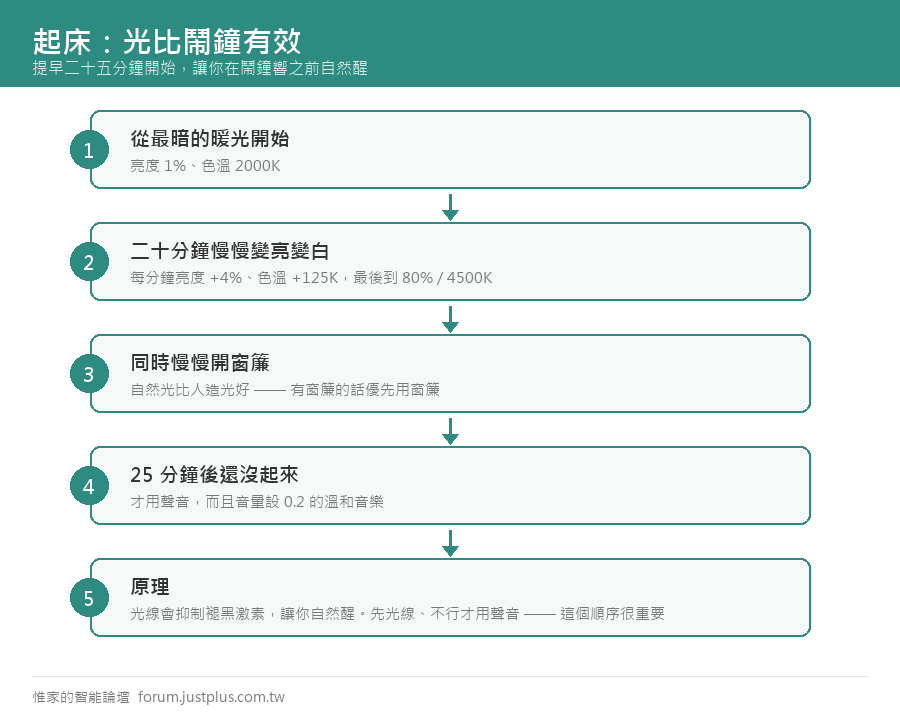
    起床:光比鬧鐘有效

    原理光線會抑制褪黑激素,讓你自然醒

    日出模擬
    1. script:
    2.   日出模擬:
    3.     mode: restart
    4.     sequence:
    5.       # 從最暗的暖光開始
    6.       - action: light.turn_on
    7.         target:
    8.           entity_id: light.主臥
    9.         data:
    10.           brightness_pct: 1
    11.           color_temp_kelvin: 2000
    12.       # 二十分鐘慢慢變亮變白
    13.       - repeat:
    14.           count: 20
    15.           sequence:
    16.             - action: light.turn_on
    17.               target:
    18.                 entity_id: light.主臥
    19.               data:
    20.                 brightness_pct: "{{ repeat.index * 4 }}"
    21.                 color_temp_kelvin: >
    22.                   {{ 2000 + repeat.index * 125 }}
    23.                 transition: 60
    24.             - delay: "00:01:00"
    複製代碼

    二十分鐘從 1% 2000K 變到 80% 4500K

    搭配窗簾
    1.       # 同時慢慢開窗簾
    2.       - action: cover.set_cover_position
    3.         target:
    4.           entity_id: cover.主臥窗簾
    5.         data:
    6.           position: 30
    7.       - delay: "00:10:00"
    8.       - action: cover.open_cover
    9.         target:
    10.           entity_id: cover.主臥窗簾
    複製代碼

    自然光比人造光好 —— 有窗簾的話優先用窗簾。

    備援:真的鬧鐘
    1. automation:
    2.   - alias: 起床流程
    3.     triggers:
    4.       - trigger: time
    5.         at: input_datetime.起床時間
    6.     actions:
    7.       # 提前 25 分鐘開始日出模擬
    8.       - action: script.日出模擬
    9.       # 25 分鐘後如果還沒起來,才用聲音
    10.       - delay: "00:25:00"
    11.       - if:
    12.           - condition: state
    13.             entity_id: binary_sensor.主臥動作
    14.             state: "off"
    15.         then:
    16.           - action: media_player.volume_set
    17.             target:
    18.               entity_id: media_player.臥室音響
    19.             data:
    20.               volume_level: 0.2
    21.           - action: media_player.play_media
    22.             target:
    23.               entity_id: media_player.臥室音響
    24.             data:
    25.               media_content_id: 溫和的音樂
    26.               media_content_type: music
    複製代碼

    先光線,不行才用聲音 —— 這個順序很重要。

    實際的作法是「提早二十五分鐘開始,讓你在鬧鐘響之前自然醒」。


    要不要追蹤睡眠

    選項


    • 智慧手錶 / 手環 —— 最常見,但戴著睡不一定舒服
    • 床墊感測器 —— Withings Sleep 之類,放床墊下
    • 毫米波感測器 —— 可以偵測呼吸,但精度有限
    • 床邊的壓力感測器 —— 自己做(知道有沒有人在床上)


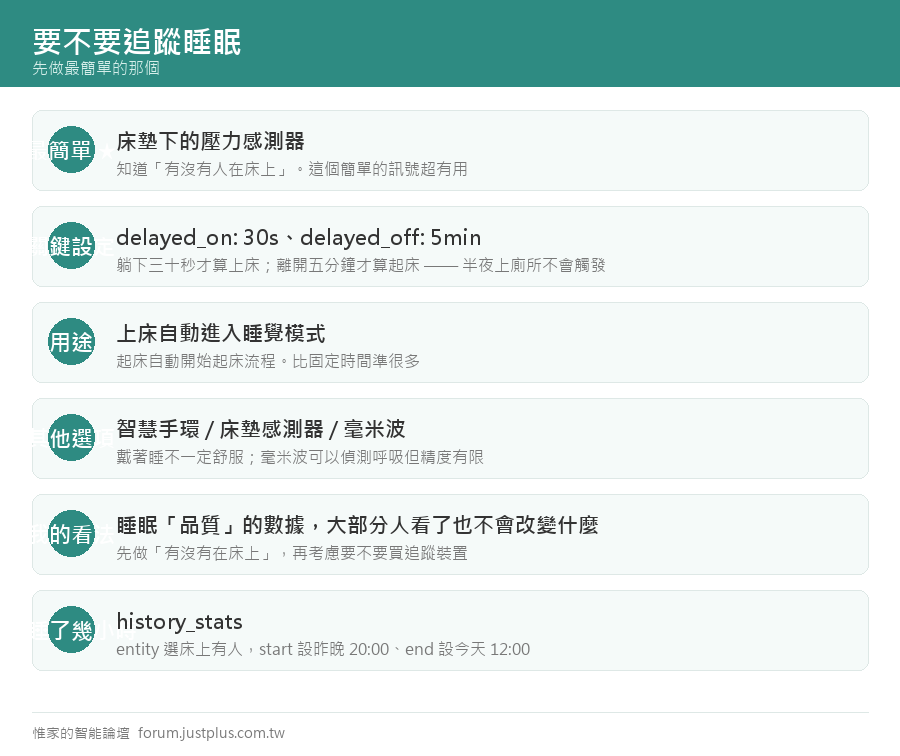
    簡單的做法:用床墊下的壓力開關
    1. binary_sensor:
    2.   - platform: gpio
    3.     pin:
    4.       number: GPIO34
    5.       mode: INPUT_PULLUP
    6.       inverted: true
    7.     name: 床上有人
    8.     device_class: occupancy
    9.     filters:
    10.       - delayed_on: 30s      # 躺下三十秒才算
    11.       - delayed_off: 5min    # 離開五分鐘才算
    複製代碼

    delayed_off: 5min 很重要 —— 半夜起來上廁所不會觸發「起床」。

    用途


    • 上床就自動進入睡覺模式
    • 起床就自動開始起床流程
    • 比固定時間準很多

    1. automation:
    2.   - alias: 上床就進入睡覺模式
    3.     triggers:
    4.       - trigger: state
    5.         entity_id: binary_sensor.床上有人
    6.         to: "on"
    7.         for: "00:05:00"
    8.     conditions:
    9.       - condition: time
    10.         after: "21:00:00"
    11.         before: "03:00:00"
    12.     actions:
    13.       - action: input_select.select_option
    14.         target:
    15.           entity_id: input_select.家庭狀態
    16.         data:
    17.           option: 睡覺
    18.       - action: script.睡眠溫度曲線
    複製代碼

    我的看法


    • 追蹤睡眠「品質」的數據,大部分人看了也不會改變什麼
    • 但「有沒有在床上」這個簡單的訊號超有用
    • 先做這個,再考慮要不要買睡眠追蹤裝置


    一個完整的睡眠相關配置
    1. 感測器
    2.   床墊壓力感測器(或毫米波)
    3.   臥室溫濕度計
    4.   臥室 CO2(選配但很有用)
    5. 控制
    6.   臥室燈(可調色溫)
    7.   床底燈帶
    8.   電動窗簾
    9.   冷氣(紅外線或原廠整合)
    10. 自動化
    11.   22:00 睡前準備(燈光轉暖、臥室預冷)
    12.   上床 → 睡覺模式 + 溫度曲線
    13.   半夜起床 → 床底燈 3%
    14.   起床前 25 分鐘 → 日出模擬 + 窗簾
    15.   起床 → 恢復正常模式
    16. 儀表板
    17.   昨晚睡了幾小時
    18.   臥室溫濕度曲線
    19.   CO2 趨勢
    複製代碼

    「昨晚睡了幾小時」的算法
    1. sensor:
    2.   - platform: history_stats
    3.     name: 昨晚睡眠時數
    4.     entity_id: binary_sensor.床上有人
    5.     state: "on"
    6.     type: time
    7.     start: "{{ today_at('20:00') - timedelta(days=1) }}"
    8.     end: "{{ today_at('12:00') }}"
    複製代碼

    ---

    下一篇:系列的最後幾篇 ——
    完整檢查表與總整理。
    您需要登入後纔可以回帖 登入 | 立即註冊

    本版積分規則

    Archiver|手機版|惟家的智能論壇

    GMT+8, 2026-9-24 12:12 , Processed in 0.075435 second(s), 24 queries .

    快速回覆 返回頂部 返回列表