|
|
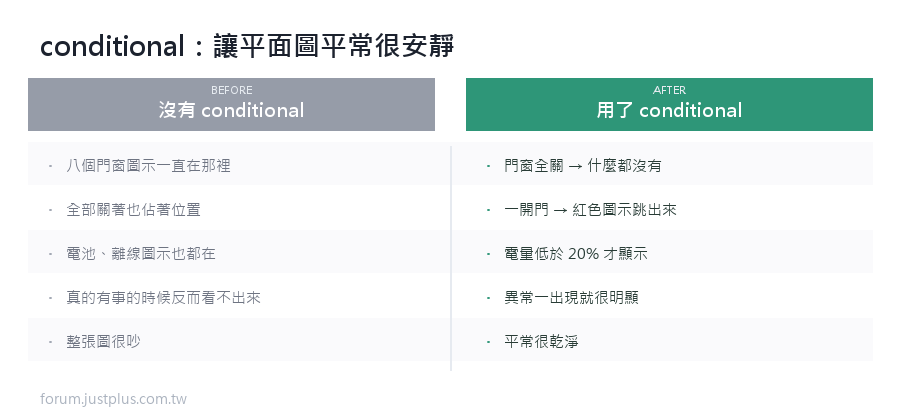
一張好的平面圖,平常應該很安靜。
門都關著、沒有漏水、沒有異常 —— 那些圖示根本不該出現。
核心觀念
conditional 元素 = 只在條件成立時才顯示的一組元素。
- - type: conditional
- conditions:
- - entity: binary_sensor.front_door
- state: "on"
- elements:
- - type: icon
- icon: mdi:door-open
- style: {top: 92%, left: 9%, color: "#e53935"}
門開著 → 圖示出現。門關著 → 圖示完全不存在。
注意 elements 是複數 —— 一個 conditional 裡面可以放好幾個元素,
它們會一起出現、一起消失。
條件的四種寫法
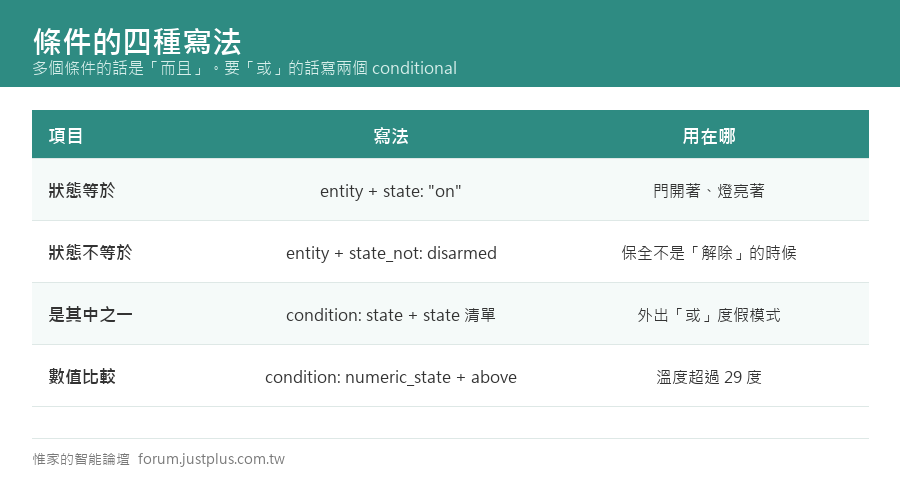
一、狀態等於某個值
- conditions:
- - entity: binary_sensor.front_door
- state: "on"
二、狀態「不等於」某個值
- conditions:
- - entity: alarm_control_panel.home
- state_not: disarmed
三、狀態是「其中之一」
- conditions:
- - condition: state
- entity: input_select.house_mode
- state:
- - 外出
- - 度假
四、數值比較
- conditions:
- - condition: numeric_state
- entity: sensor.living_room_temperature
- above: 29
多個條件的話是「而且」
- conditions:
- - entity: binary_sensor.front_door
- state: "on"
- - entity: input_select.house_mode
- state: 外出
門開著「而且」在外出模式 → 才顯示。
要「或」的話,寫兩個 conditional 就好(各自獨立判斷)。
五個實用的應用
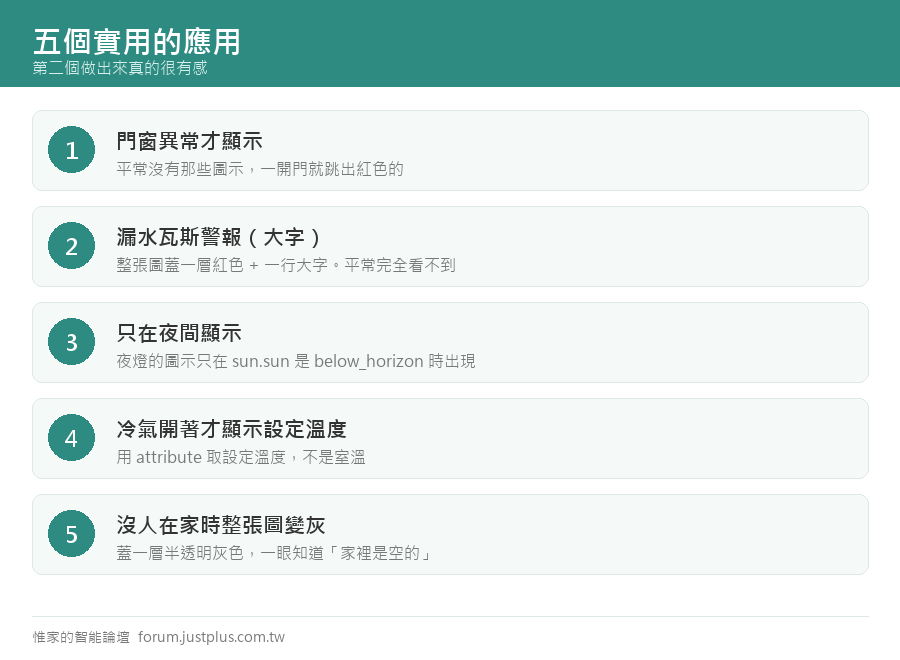
應用一:門窗異常才顯示
- # 大門
- - type: conditional
- conditions:
- - entity: binary_sensor.front_door
- state: "on"
- elements:
- - type: icon
- icon: mdi:door-open
- title: 大門開著
- style:
- top: 92%
- left: 9%
- color: "#e53935"
- "--mdc-icon-size": 30px
- # 陽台門
- - type: conditional
- conditions:
- - entity: binary_sensor.balcony_door
- state: "on"
- elements:
- - type: icon
- icon: mdi:door-sliding-open
- title: 陽台門開著
- style:
- top: 12%
- left: 3%
- color: "#e53935"
- "--mdc-icon-size": 30px
平常這兩個圖示都不在,一開門就跳出紅色的。
應用二:漏水、瓦斯警報(大字提醒)
- - type: conditional
- conditions:
- - condition: or
- conditions:
- - entity: binary_sensor.kitchen_leak
- state: "on"
- - entity: binary_sensor.bathroom_leak
- state: "on"
- elements:
- - type: image
- image: /local/floorplan/alert_overlay.png
- style: {top: 50%, left: 50%, width: 100%}
- - type: state-label
- entity: binary_sensor.kitchen_leak
- prefix: "⚠ 偵測到漏水"
- style:
- top: 50%
- left: 50%
- font-size: 26px
- font-weight: bold
- color: white
- background-color: "rgba(211,47,47,0.92)"
- padding: 10px 22px
- border-radius: 12px
平常完全看不到,出事的時候整張圖會蓋一層紅色 + 一行大字。
這個做出來真的很有感。
應用三:只在夜間顯示的元素
- - type: conditional
- conditions:
- - condition: state
- entity: sun.sun
- state: below_horizon
- elements:
- - type: state-icon
- entity: light.night_light
- style: {top: 78%, left: 50%}
夜燈的圖示只在天黑之後才出現。
應用四:冷氣開著才顯示溫度設定
- - type: conditional
- conditions:
- - entity: climate.living_room
- state_not: "off"
- elements:
- - type: state-label
- entity: climate.living_room
- attribute: temperature
- prefix: "❄ "
- suffix: "°"
- style:
- top: 10%
- left: 34%
- font-size: 15px
- color: "#1e88e5"
- background-color: "rgba(255,255,255,0.9)"
- padding: 2px 8px
- border-radius: 9px
attribute 可以取屬性(這裡是冷氣的設定溫度,不是室溫)。
應用五:有人在家 / 沒人在家的整體氛圍
- - type: conditional
- conditions:
- - entity: binary_sensor.someone_home
- state: "off"
- elements:
- - type: image
- image: /local/floorplan/dim_overlay.png
- style: {top: 50%, left: 50%, width: 100%}
沒人在家的時候整張圖蓋一層半透明的灰色,
一眼就知道「家裡現在是空的」。

「乾淨」的設計原則
我整理平面圖的原則是:
常態 = 什麼都不顯示。異常 = 跳出來。
具體來說:
- 門窗 → 只在開著時顯示
- 漏水、瓦斯、煙霧 → 只在觸發時顯示(而且要很顯眼)
- 電池電量 → 只在低於 20% 時顯示
- 裝置離線 → 只在 unavailable 時顯示
- 溫度 → 一直顯示(這個是常態資訊)
- 燈 → 一直顯示(這個要能操作)
電池和離線的寫法:
- - type: conditional
- conditions:
- - condition: numeric_state
- entity: sensor.bedroom_sensor_battery
- below: 20
- elements:
- - type: icon
- icon: mdi:battery-alert
- title: 臥室感應器電量低
- style:
- top: 88%
- left: 44%
- color: "#fb8c00"
- "--mdc-icon-size": 22px
一個綜合的「異常總覽」做法
與其在每個位置放一個條件元素,
不如做一個總的異常指示放在角落:
- # configuration.yaml
- template:
- - binary_sensor:
- - name: 家裡有異常
- unique_id: home_has_problem
- device_class: problem
- state: >
- {{ is_state('binary_sensor.all_doors','on')
- or is_state('binary_sensor.any_leak','on')
- or states('sensor.low_battery_count') | int(0) > 0
- or states('sensor.unavailable_entities') | int(0) > 0 }}
- attributes:
- 細節: >
- {% set p = [] %}
- {% if is_state('binary_sensor.all_doors','on') %}
- {% set p = p + ['有門窗開著'] %}
- {% endif %}
- {% if is_state('binary_sensor.any_leak','on') %}
- {% set p = p + ['偵測到漏水'] %}
- {% endif %}
- {{ p | join('、') if p else '正常' }}
平面圖上:
- - type: conditional
- conditions:
- - entity: binary_sensor.家裡有異常
- state: "on"
- elements:
- - type: state-label
- entity: binary_sensor.家裡有異常
- attribute: 細節
- prefix: "⚠ "
- style:
- top: 4%
- left: 50%
- font-size: 15px
- color: white
- background-color: "rgba(230,81,0,0.92)"
- padding: 4px 14px
- border-radius: 14px
- tap_action:
- action: navigate
- navigation_path: /lovelace/status
平常什麼都沒有,有事的時候頂端跳出一條橘色的提示,點下去跳到詳細頁。
兩個注意事項
一、conditional 裡面的元素還是要有自己的 style
conditional 本身不佔位置,它只是一個容器。
裡面每個元素都要自己寫 top / left。
二、條件切換的瞬間會「跳」出來
沒有淡入淡出效果。
想要漸變的話,不要用 conditional,
改用 opacity 加範本(配下一篇的 CSS 動畫):
- - type: icon
- icon: mdi:door-open
- style:
- top: 92%
- left: 9%
- color: "#e53935"
- transition: opacity 0.4s
- opacity: >
- {{ 1 if is_state('binary_sensor.front_door','on') else 0 }}
這樣門開的時候圖示會慢慢淡入,關的時候慢慢淡出。
---
下一篇:用 card-mod 幫平面圖加動畫。
不用換成 SVG,也能做出脈動、閃爍、漸變的效果。 |
|




 窺視卡
窺視卡 雷達卡
雷達卡


 發表於
發表於  提升卡
提升卡 置頂卡
置頂卡 沉默卡
沉默卡 喧囂卡
喧囂卡 變色卡
變色卡 千斤頂
千斤頂 照妖鏡
照妖鏡