找回密碼
 立即註冊
惟家LINE群QRCODE
    查看: 1|回覆: 0

    家庭劇院自動化:投影機、燈光、窗簾的完整腳本

    [複製鏈接]

    !lvup!   100%

    363

    主題

    27

    回帖

    2200萬

    積分

    管理員

    積分
    22005752
    發表於 3 天前 | 顯示全部樓層 |閱讀模式
    看電影前要做的事:關燈、拉窗簾、開投影機、關冷氣風速、
    把手機轉靜音……

    這些全部可以一鍵完成。


    先想清楚觸發方式

    三種選擇:


    • 手動 —— 手機按鈕、語音、實體按鈕
    • 自動 —— 偵測投影機或電視開機
    • 混合 —— 自動偵測 + 手動覆蓋


    我推薦混合:自動偵測當主要,但保留手動入口。

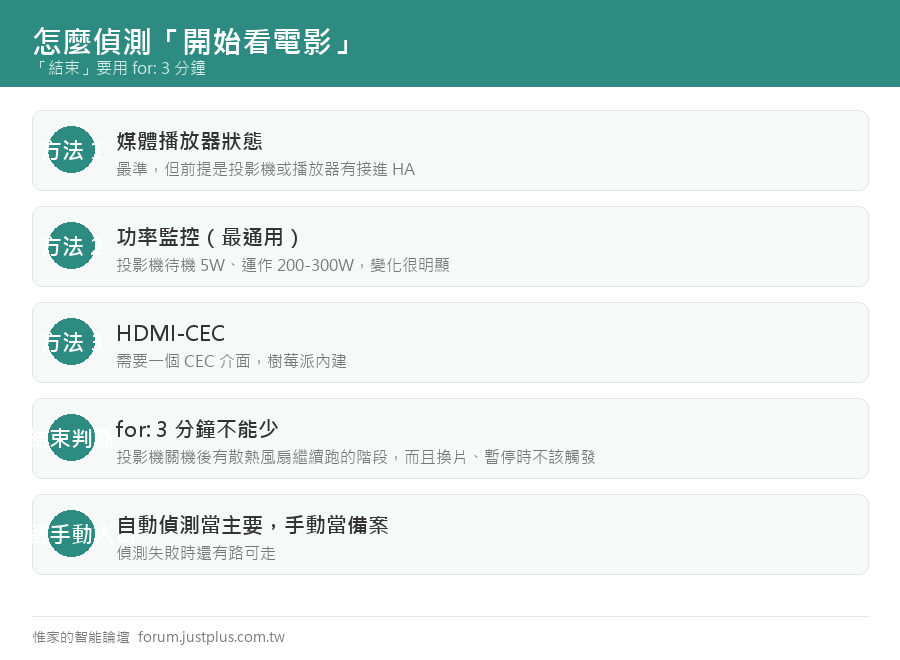
    怎麼偵測「開始看電影」

    方法 1:媒體播放器狀態(最準)
    1. triggers:
    2.   - trigger: state
    3.     entity_id: media_player.projector
    4.     to: "playing"
    複製代碼

    前提是你的投影機或播放器有接進 HA。

    方法 2:功率監控(最通用)

    投影機接在智能插座上:
    1. triggers:
    2.   - trigger: numeric_state
    3.     entity_id: sensor.projector_power
    4.     above: 100
    5.     for: "00:01:00"
    複製代碼

    投影機的功率變化很明顯(待機 5W,運作 200-300W)。

    方法 3:HDMI-CEC(下一篇會講)

    完整的「看電影」腳本
    1. script:
    2.   movie_mode:
    3.     alias: 看電影模式
    4.     icon: mdi:movie-open
    5.     mode: single
    6.     sequence:
    7.       # 1. 先把現況存起來(結束後還原)
    8.       - action: scene.create
    9.         data:
    10.           scene_id: before_movie
    11.           snapshot_entities:
    12.             - light.living_room_main
    13.             - light.living_room_ambient
    14.             - light.dining_room
    15.             - cover.living_room_curtain
    16.             - climate.living_room
    17.             - media_player.living_room_speaker
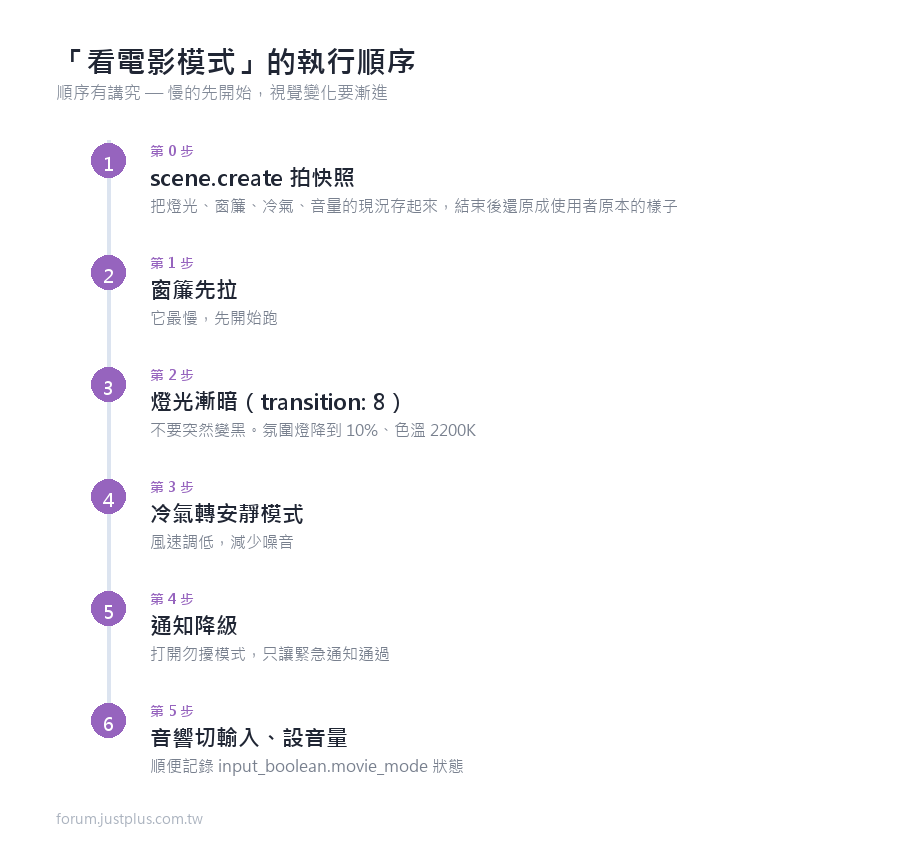
    18.       # 2. 窗簾先拉(比較慢,先開始)
    19.       - action: cover.close_cover
    20.         target: {entity_id: cover.living_room_curtain}
    21.       # 3. 燈光漸暗(不要突然變黑)
    22.       - action: light.turn_off
    23.         target:
    24.           entity_id:
    25.             - light.living_room_main
    26.             - light.dining_room
    27.         data: {transition: 8}
    28.       - action: light.turn_on
    29.         target: {entity_id: light.living_room_ambient}
    30.         data:
    31.           brightness_pct: 10
    32.           color_temp_kelvin: 2200
    33.           transition: 8
    34.       # 4. 冷氣轉安靜模式
    35.       - action: climate.set_fan_mode
    36.         target: {entity_id: climate.living_room}
    37.         data: {fan_mode: low}
    38.       # 5. 通知降級
    39.       - action: input_boolean.turn_on
    40.         target: {entity_id: input_boolean.勿擾模式}
    41.       # 6. 音響切到正確的輸入
    42.       - action: media_player.select_source
    43.         target: {entity_id: media_player.av_receiver}
    44.         data: {source: HDMI1}
    45.       - action: media_player.volume_set
    46.         target: {entity_id: media_player.av_receiver}
    47.         data: {volume_level: 0.4}
    48.       # 7. 記錄狀態
    49.       - action: input_boolean.turn_on
    50.         target: {entity_id: input_boolean.movie_mode}
    51.   movie_end:
    52.     alias: 結束看電影
    53.     icon: mdi:movie-off
    54.     mode: single
    55.     sequence:
    56.       - action: input_boolean.turn_off
    57.         target: {entity_id: input_boolean.movie_mode}
    58.       - action: input_boolean.turn_off
    59.         target: {entity_id: input_boolean.勿擾模式}
    60.       # 還原之前的狀態
    61.       - if:
    62.           - condition: template
    63.             value_template: >
    64.               {{ states('scene.before_movie')
    65.                  not in ['unknown','unavailable'] }}
    66.         then:
    67.           - action: scene.turn_on
    68.             target: {entity_id: scene.before_movie}
    69.             data: {transition: 5}
    70.         else:
    71.           # 臨時場景不見了(HA 重啟過)就用預設
    72.           - action: light.turn_on
    73.             target: {entity_id: light.living_room_main}
    74.             data:
    75.               brightness_pct: >
    76.                 {{ 30 if (now().hour >= 22 or now().hour < 6) else 70 }}
    77.               transition: 5
    複製代碼


    串起來的自動化
    1. alias: 看電影模式自動切換
    2. id: movie_mode_auto
    3. triggers:
    4.   - trigger: numeric_state
    5.     entity_id: sensor.projector_power
    6.     above: 100
    7.     for: "00:01:00"
    8.     id: 開始
    9.   - trigger: numeric_state
    10.     entity_id: sensor.projector_power
    11.     below: 30
    12.     for: "00:03:00"
    13.     id: 結束
    14. actions:
    15.   - choose:
    16.       - conditions:
    17.           - condition: trigger
    18.             id: 開始
    19.           - condition: state
    20.             entity_id: input_boolean.movie_mode
    21.             state: "off"
    22.         sequence:
    23.           - action: script.movie_mode
    24.       - conditions:
    25.           - condition: trigger
    26.             id: 結束
    27.           - condition: state
    28.             entity_id: input_boolean.movie_mode
    29.             state: "on"
    30.         sequence:
    31.           - action: script.movie_end
    32. mode: single
    複製代碼

    「結束」用 for: 3 分鐘,因為:


    • 投影機關機後有散熱風扇繼續跑的階段
    • 換片、暫停的時候不該觸發


    幾個加分的細節

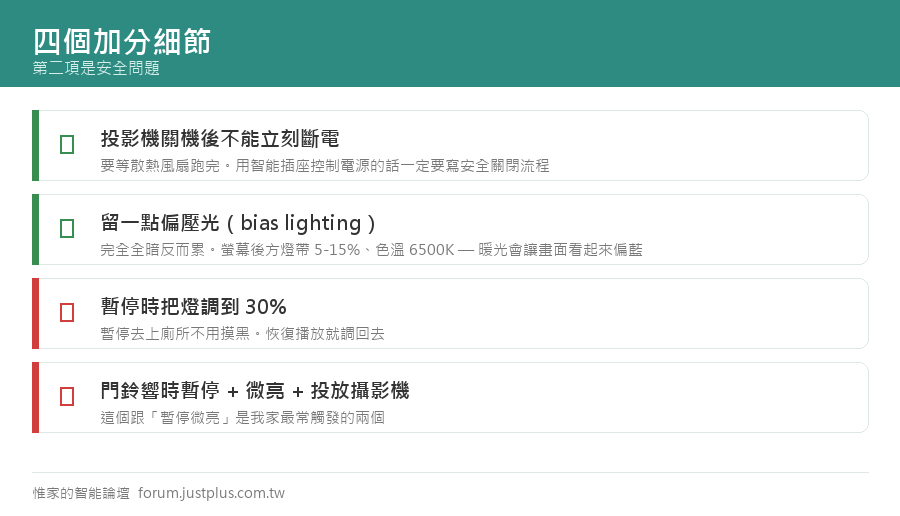
    一、暫停時把燈調亮一點
    1. alias: 電影暫停時微亮
    2. triggers:
    3.   - trigger: state
    4.     entity_id: media_player.projector
    5.     to: "paused"
    6.     for: "00:00:30"
    7. conditions:
    8.   - condition: state
    9.     entity_id: input_boolean.movie_mode
    10.     state: "on"
    11. actions:
    12.   - action: light.turn_on
    13.     target: {entity_id: light.living_room_ambient}
    14.     data:
    15.       brightness_pct: 30
    16.       transition: 3
    17. mode: single
    複製代碼

    配一個「恢復播放就調暗」的反向自動化。

    這個細節很有感 —— 暫停去上廁所的時候不用摸黑。

    二、片尾字幕時慢慢亮起來

    沒辦法自動偵測片尾,但可以做一個按鈕。
    或者如果你的播放器有「接近結束」的資訊,可以用。

    三、有人按門鈴時暫停
    1. alias: 門鈴響時暫停電影
    2. triggers:
    3.   - trigger: state
    4.     entity_id: binary_sensor.doorbell
    5.     to: "on"
    6. conditions:
    7.   - condition: state
    8.     entity_id: input_boolean.movie_mode
    9.     state: "on"
    10. actions:
    11.   - action: media_player.media_pause
    12.     target: {entity_id: media_player.projector}
    13.   - action: light.turn_on
    14.     target: {entity_id: light.living_room_ambient}
    15.     data: {brightness_pct: 40, transition: 2}
    16.   # 順便投到 Nest Hub 看門口
    17.   - action: camera.play_stream
    18.     target: {entity_id: camera.front_door}
    19.     data:
    20.       media_player: media_player.living_room_display
    21.       format: hls
    22. mode: single
    複製代碼

    四、投影機的散熱保護

    投影機關機後不能立刻斷電(燈泡機更是絕對不行),
    要等散熱風扇跑完。

    如果你用智能插座控制投影機電源,一定要注意這點
    1. script:
    2.   projector_off_safe:
    3.     alias: 安全關閉投影機
    4.     sequence:
    5.       # 1. 先用遙控或 API 關機(不是直接斷電)
    6.       - action: media_player.turn_off
    7.         target: {entity_id: media_player.projector}
    8.       # 2. 等功率降到散熱階段
    9.       - wait_template: >
    10.           {{ states('sensor.projector_power') | float(999) < 60 }}
    11.         timeout: "00:02:00"
    12.       # 3. 再等散熱跑完
    13.       - wait_template: >
    14.           {{ states('sensor.projector_power') | float(999) < 15 }}
    15.         timeout: "00:05:00"
    16.       # 4. 這時候才能斷電
    17.       - delay: "00:00:30"
    18.       - action: switch.turn_off
    19.         target: {entity_id: switch.projector_outlet}
    20.     mode: single
    複製代碼

    直接斷電可能縮短燈泡壽命,甚至損壞投影機。

    雷射光源的機種比較寬容,但還是建議照正常程序關。


    五、環境光的建議

    完全全暗其實不是最好的


    • 眼睛在黑暗中看亮螢幕比較累
    • 長時間容易眼睛疲勞


    建議留一點「偏壓光(bias lighting)」


    • 在螢幕或布幕後方放一條燈帶
    • 亮度很低(5-15%)
    • 色溫 6500K(接近 D65 標準,不會影響你對畫面顏色的判斷)


    注意:偏壓光的色溫要用 6500K,不是暖光 ——
    暖光會讓你覺得畫面偏藍。
    1.   - action: light.turn_on
    2.     target: {entity_id: light.screen_bias}
    3.     data:
    4.       brightness_pct: 10
    5.       color_temp_kelvin: 6500
    複製代碼

    六、Ambilight 效果(進階)

    用螢幕邊緣的顏色去控制背後的燈帶。


    • 硬體方案:HDMI 擷取卡 + 一台小電腦(例如 Hyperion)
    • 軟體方案:如果內容來自電腦或 Android TV,有些 App 可以做
    • 簡化版:不做即時同步,只依「現在播什麼類型」設定固定色調


    老實說這個維護成本不低,而且延遲沒調好反而干擾。
    我試過之後拆掉了。

    ---

    我家這套跑了一年多,最常觸發的其實是
    「暫停時微亮」「門鈴時暫停」

    主要的燈光窗簾切換反而習慣之後就無感了 ——
    但那正是好的自動化應該有的樣子。
    您需要登入後纔可以回帖 登入 | 立即註冊

    本版積分規則

    Archiver|手機版|惟家的智能論壇

    GMT+8, 2026-9-24 12:12 , Processed in 0.083264 second(s), 24 queries .

    快速回覆 返回頂部 返回列表