找回密碼
 立即註冊
惟家LINE群QRCODE
    查看: 2|回覆: 0

    Tile 卡片完全指南:badges、features、顏色與版面

    [複製鏈接]

    !lvup!   100%

    363

    主題

    27

    回帖

    2200萬

    積分

    管理員

    積分
    22005752
    發表於 3 天前 | 顯示全部樓層 |閱讀模式
    Tile 是 Sections 版面最推薦的卡片
    也是現在 HA 的預設卡片。

    它功能比大多數人用到的多很多。


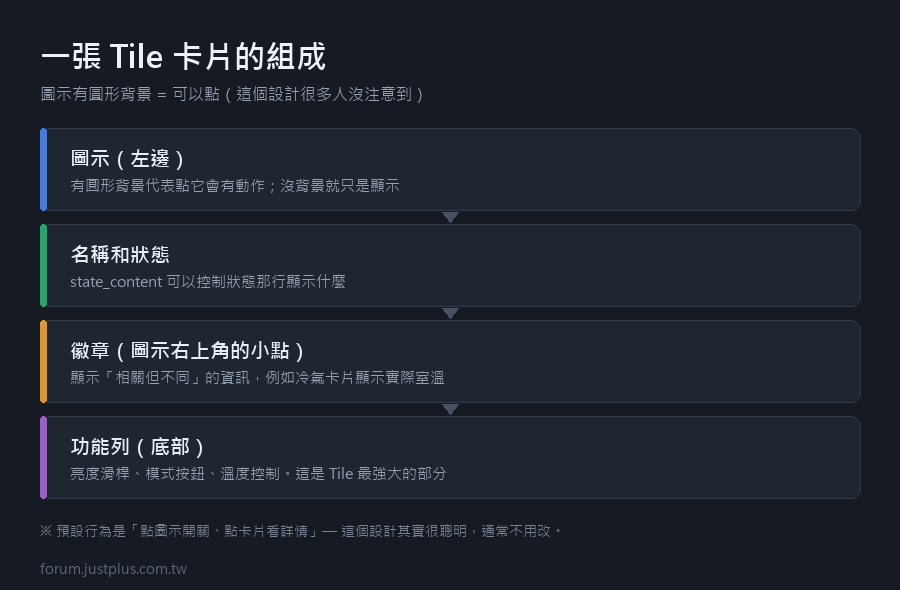
    一張 Tile 卡片的組成


    • 圖示(左邊)—— 有圓形背景的話代表可以點
    • 名稱
    • 狀態(名稱下面那行)
    • 徽章(圖示右上角的小點)
    • 功能列(底部,例如亮度滑桿)


    最基本的寫法
    1. type: tile
    2. entity: light.living_room
    複製代碼

    就這樣,其他都有預設值。

    一、圖示的圓形背景代表什麼

    這是一個很多人沒注意到的設計


    • 圖示有圓形背景 → 點它會有動作
    • 圖示沒有背景 → 只是顯示


    所以看到圓形背景就知道「這裡可以點」。

    二、顏色
    1. type: tile
    2. entity: light.living_room
    3. color: amber
    複製代碼

    預設的顏色是依照「狀態 + 網域 + 裝置類別」自動決定的


    • 燈開著 → 黃色
    • 門開著 → 紅色
    • 溫度 → 依數值


    可用的顏色名稱:primary、accent、red、pink、purple、
    deep-purple、indigo、blue、light-blue、cyan、teal、green、
    light-green、lime、yellow、amber、orange、deep-orange、
    brown、grey、blue-grey、black、white、disabled。

    也可以用範本
    1. color: >
    2.   {% set t = states('sensor.living_room_temperature') | float(25) %}
    3.   {% if t > 29 %}red
    4.   {% elif t > 27 %}orange
    5.   {% elif t < 20 %}blue
    6.   {% else %}green
    7.   {% endif %}
    複製代碼


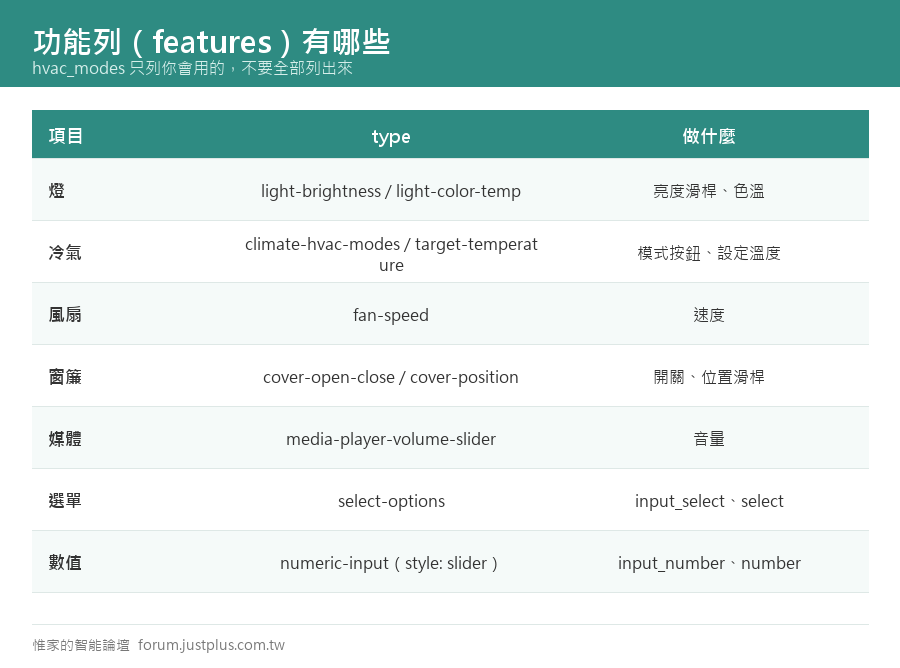
    三、功能列(features)—— 最強大的部分

    功能列是卡片底部那一排控制項。

    燈:亮度滑桿
    1. type: tile
    2. entity: light.living_room
    3. features:
    4.   - type: light-brightness
    複製代碼

    燈:色溫
    1. features:
    2.   - type: light-brightness
    3.   - type: light-color-temp
    複製代碼

    冷氣:模式 + 溫度
    1. type: tile
    2. entity: climate.living_room
    3. features:
    4.   - type: climate-hvac-modes
    5.     hvac_modes:
    6.       - "off"
    7.       - cool
    8.       - dry
    9.   - type: target-temperature
    複製代碼

    hvac_modes 可以只列你會用的 ——
    不要把 heat、auto、fan_only 全部列出來,那樣按鈕太多。

    風扇:速度
    1. type: tile
    2. entity: fan.living_room
    3. features:
    4.   - type: fan-speed
    複製代碼

    窗簾:開關 + 位置
    1. type: tile
    2. entity: cover.living_room_curtain
    3. features:
    4.   - type: cover-open-close
    5.   - type: cover-position
    複製代碼

    媒體播放器
    1. type: tile
    2. entity: media_player.living_room
    3. features:
    4.   - type: media-player-volume-slider
    複製代碼

    通用:選項按鈕(input_select、select)
    1. type: tile
    2. entity: input_select.house_mode
    3. features:
    4.   - type: select-options
    複製代碼

    通用:數值滑桿(input_number、number)
    1. type: tile
    2. entity: input_number.humidity_threshold
    3. features:
    4.   - type: numeric-input
    5.     style: slider
    複製代碼

    功能列的位置(比較新的選項)
    1. features_position: bottom    # 預設,在下面
    2. features_position: inline    # 跟圖示同一行
    複製代碼

    inline 適合只有一個簡單功能的情況,可以省一行高度。


    四、徽章(圖示右上角的小點)
    1. type: tile
    2. entity: climate.living_room
    3. state_content:
    4.   - state
    5.   - current_temperature
    6. badge:
    7.   type: entity
    8.   entity: sensor.living_room_temperature
    9.   color: blue
    複製代碼

    用途:在一張卡片上顯示相關但不同的資訊。

    例如:


    • 冷氣卡片 → 徽章顯示實際室溫
    • 燈卡片 → 徽章顯示該房間的人體感應狀態
    • 洗衣機卡片 → 徽章顯示目前功率


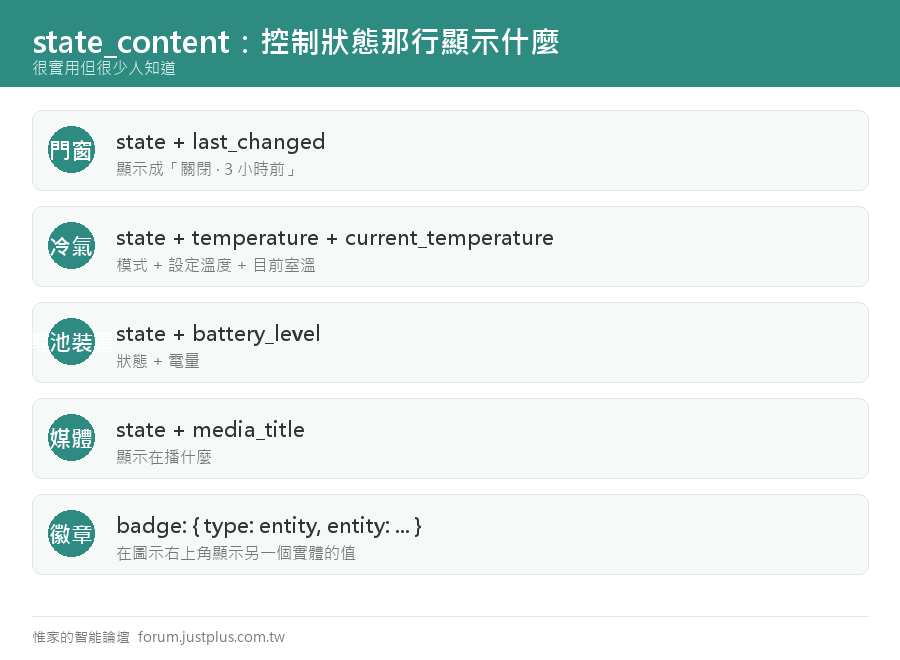
    五、state_content:控制「狀態那一行顯示什麼」

    這個很實用但很少人知道。
    1. type: tile
    2. entity: binary_sensor.front_door
    3. state_content:
    4.   - state
    5.   - last_changed
    複製代碼

    顯示成「關閉 · 3 小時前」。

    可以放的內容


    • state —— 狀態
    • name —— 名稱
    • last_changed —— 上次改變(相對時間)
    • last_updated
    • 任何屬性名稱


    實用範例
    1. # 冷氣:顯示模式 + 設定溫度 + 目前室溫
    2. type: tile
    3. entity: climate.living_room
    4. state_content:
    5.   - state
    6.   - temperature
    7.   - current_temperature
    8. # 電池裝置:顯示狀態 + 電量
    9. type: tile
    10. entity: binary_sensor.bedroom_motion
    11. state_content:
    12.   - state
    13.   - battery_level
    14. # 媒體播放器:顯示在播什麼
    15. type: tile
    16. entity: media_player.living_room
    17. state_content:
    18.   - state
    19.   - media_title
    複製代碼

    六、點擊動作
    1. type: tile
    2. entity: light.living_room
    3. tap_action:
    4.   action: toggle
    5. icon_tap_action:
    6.   action: more-info
    複製代碼

    注意有兩個


    • tap_action —— 點卡片本體(名稱那一區)
    • icon_tap_action —— 點圖示


    預設值


    • tap_action 預設是 more-info
    • icon_tap_action 預設是 toggle(可切換的實體)


    所以預設行為是「點圖示開關、點卡片看詳情」 ——
    這個設計其實很聰明,通常不用改


    七、幾個實用的完整範例

    客廳的燈(最常用的配置)
    1. type: tile
    2. entity: light.living_room
    3. name: 客廳
    4. features:
    5.   - type: light-brightness
    6. grid_options:
    7.   columns: 12
    複製代碼

    冷氣
    1. type: tile
    2. entity: climate.living_room
    3. name: 客廳冷氣
    4. state_content:
    5.   - state
    6.   - current_temperature
    7. features:
    8.   - type: climate-hvac-modes
    9.     hvac_modes: ["off", cool, dry]
    10.   - type: target-temperature
    11. badge:
    12.   type: entity
    13.   entity: sensor.living_room_humidity
    複製代碼

    門窗(只顯示、不能點)
    1. type: tile
    2. entity: binary_sensor.front_door
    3. name: 大門
    4. state_content:
    5.   - state
    6.   - last_changed
    7. tap_action:
    8.   action: more-info
    9. icon_tap_action:
    10.   action: none
    11. grid_options:
    12.   columns: 6
    複製代碼

    場景按鈕
    1. type: tile
    2. entity: scene.movie
    3. name: 看電影
    4. icon: mdi:movie-open
    5. color: purple
    6. tap_action:
    7.   action: perform-action
    8.   perform_action: scene.turn_on
    9.   target:
    10.     entity_id: scene.movie
    11. icon_tap_action:
    12.   action: perform-action
    13.   perform_action: scene.turn_on
    14.   target:
    15.     entity_id: scene.movie
    16. grid_options:
    17.   columns: 4
    複製代碼

    兩個都設成一樣,這樣點哪裡都會執行。

    八、垂直版面(vertical)
    1. type: tile
    2. entity: light.living_room
    3. vertical: true
    4. grid_options:
    5.   columns: 3
    複製代碼

    圖示在上、文字在下,適合做成一排小按鈕。

    四個並排的話每個設 columns: 3。

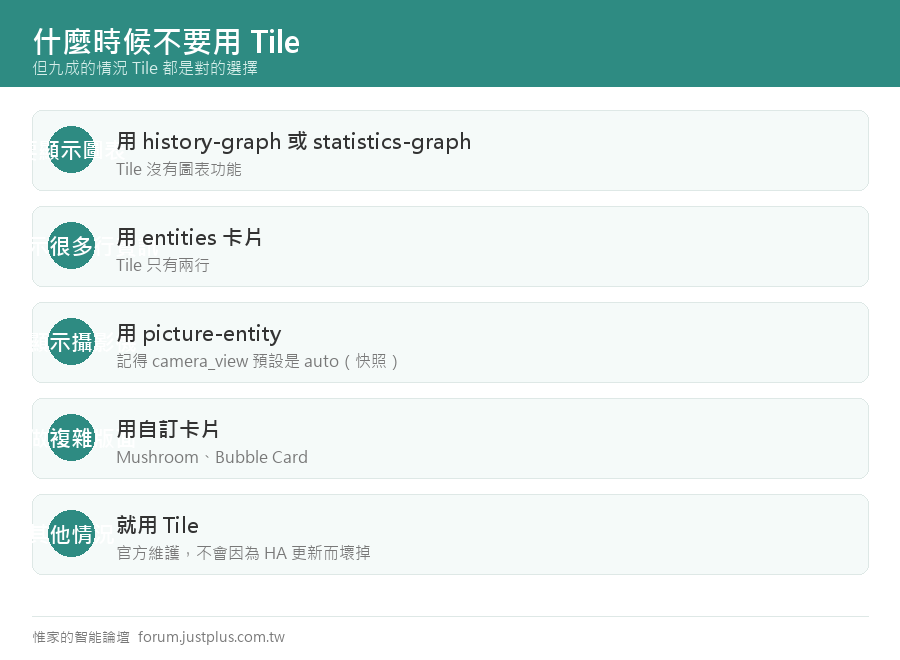
    九、什麼時候不要用 Tile


    • 要顯示圖表 → 用 history-graph 或 statistics-graph
    • 要顯示很多行資訊 → 用 entities 卡片
    • 要顯示攝影機 → 用 picture-entity
    • 要做複雜版面 → 用自訂卡片(Mushroom、Bubble Card)


    但九成的情況 Tile 都是對的選擇
    而且它是官方維護的,不會因為 HA 更新而壞掉

    ---

    下一篇:card-mod 入門 ——
    三行 CSS 改變一張卡片的外觀。
    您需要登入後纔可以回帖 登入 | 立即註冊

    本版積分規則

    Archiver|手機版|惟家的智能論壇

    GMT+8, 2026-9-24 12:19 , Processed in 0.111452 second(s), 24 queries .

    快速回覆 返回頂部 返回列表