找回密碼
 立即註冊
惟家LINE群QRCODE
    查看: 3|回覆: 0

    我的 HA 設定資料夾長什麼樣(完整結構公開)

    [複製鏈接]

    !lvup!   100%

    363

    主題

    27

    回帖

    2200萬

    積分

    管理員

    積分
    22005764
    發表於 3 天前 | 顯示全部樓層 |閱讀模式
    看過很多人的設定分享,大多只貼片段。
    這篇直接把整個結構攤開,順便講每個決定背後的理由。


    完整結構
    1. /config
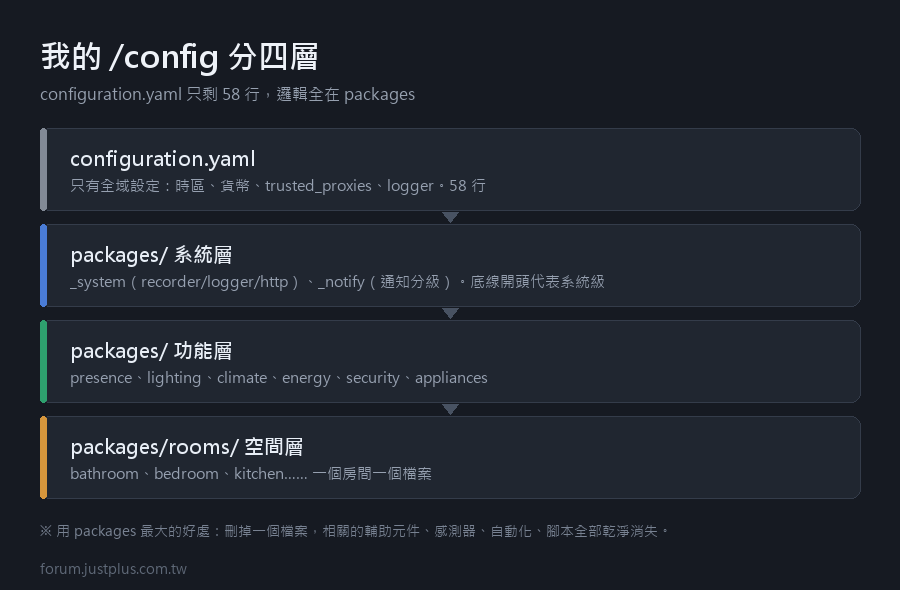
    2. ├── configuration.yaml          # 只剩 58 行
    3. ├── automations.yaml            # UI 編輯器專用,我不手動改
    4. ├── scripts.yaml                # 同上
    5. ├── scenes.yaml                 # 同上
    6. ├── secrets.yaml                # 密碼與權杖(不進版控)
    7. ├── .gitignore
    8. ├── known_devices.yaml          # 舊的,其實已經沒用了
    9. ├── packages/                   # 主戰場
    10. │   ├── _system.yaml            # recorder、logger、http
    11. │   ├── _notify.yaml            # 通知服務與分級
    12. │   ├── presence.yaml           # 在家判斷
    13. │   ├── lighting.yaml           # 跨房間的燈光邏輯
    14. │   ├── climate.yaml            # 冷氣與除濕
    15. │   ├── energy.yaml             # 用電監控
    16. │   ├── security.yaml           # 門窗與警報
    17. │   ├── appliances.yaml         # 洗衣機、掃地機
    18. │   └── rooms/
    19. │       ├── bathroom.yaml
    20. │       ├── bedroom.yaml
    21. │       ├── kitchen.yaml
    22. │       ├── living_room.yaml
    23. │       └── study.yaml
    24. ├── blueprints/
    25. │   └── automation/
    26. │       └── charles/
    27. │           ├── motion_light.yaml
    28. │           └── low_battery.yaml
    29. ├── custom_components/          # HACS 裝的(不進版控)
    30. ├── www/                        # 圖片、自訂卡片
    31. │   └── local/
    32. │       └── floorplan.png
    33. ├── scripts/                    # shell 腳本
    34. │   ├── git_autocommit.sh
    35. │   └── backup_to_nas.sh
    36. ├── ssh/                        # 金鑰(不進版控)
    37. └── themes/
    複製代碼

    configuration.yaml 裡剩什麼
    1. default_config:
    2. homeassistant:
    3.   name: 家
    4.   latitude: !secret home_latitude
    5.   longitude: !secret home_longitude
    6.   elevation: 12
    7.   unit_system: metric
    8.   currency: TWD
    9.   country: TW
    10.   time_zone: Asia/Taipei
    11.   packages: !include_dir_merge_named packages/
    12. frontend:
    13.   themes: !include_dir_merge_named themes/
    14. automation: !include automations.yaml
    15. script: !include scripts.yaml
    16. scene: !include scenes.yaml
    17. http:
    18.   use_x_forwarded_for: true
    19.   trusted_proxies:
    20.     - 192.168.1.20        # 反向代理的 IP
    21. logger:
    22.   default: warning
    23.   logs:
    24.     homeassistant.components.zha: info
    複製代碼

    就這樣。所有實際的邏輯都在 packages 裡。

    為什麼是 packages 而不是 !include

    一句話:刪除的時候不會留垃圾。

    我拆掉過一個「陽台植物澆水」的自動化。
    如果是 !include 的結構,我要去 sensors.yaml、automations.yaml、
    input_numbers.yaml、scripts.yaml 四個地方各刪一段 —— 一定會漏。

    用 packages 的話,刪掉 plants.yaml 就全部乾淨消失


    一個 package 長什麼樣:bathroom.yaml
    1. # ============ 浴室 ============
    2. # 這個檔案包含浴室的所有東西。
    3. # 刪掉這個檔案 = 浴室的所有自動化、感測器、輔助元件一起消失。
    4. input_number:
    5.   bathroom_humidity_threshold:
    6.     name: 浴室除濕門檻
    7.     min: 50
    8.     max: 95
    9.     step: 5
    10.     initial: 75
    11.     unit_of_measurement: "%"
    12.     icon: mdi:water-percent
    13. input_boolean:
    14.   bathroom_guest_mode:
    15.     name: 浴室訪客模式
    16.     icon: mdi:account-question
    17. template:
    18.   - binary_sensor:
    19.       - name: 浴室太濕
    20.         unique_id: bathroom_too_humid
    21.         device_class: moisture
    22.         delay_on: "00:02:00"
    23.         delay_off: "00:10:00"
    24.         state: >
    25.           {{ states('sensor.bathroom_humidity') | float(0)
    26.              > states('input_number.bathroom_humidity_threshold') | float(75) }}
    27. automation:
    28.   - alias: 浴室感應燈
    29.     id: bathroom_motion_light          # ← 一定要給 id
    30.     use_blueprint:
    31.       path: charles/motion_light.yaml
    32.       input:
    33.         motion_sensor: binary_sensor.bathroom_motion
    34.         target_light:
    35.           entity_id: light.bathroom
    36.         no_motion_wait: 180
    37.         day_brightness: 90
    38.         night_brightness: 5
    39.   - alias: 浴室太濕自動抽風
    40.     id: bathroom_auto_fan
    41.     triggers:
    42.       - trigger: state
    43.         entity_id: binary_sensor.浴室太濕
    44.         to: "on"
    45.     actions:
    46.       - action: switch.turn_on
    47.         target:
    48.           entity_id: switch.bathroom_fan
    49.       - wait_template: >
    50.           {{ is_state('binary_sensor.浴室太濕', 'off') }}
    51.         timeout: "01:00:00"
    52.       - action: switch.turn_off
    53.         target:
    54.           entity_id: switch.bathroom_fan
    55.     mode: restart
    56. script:
    57.   bathroom_dry:
    58.     alias: 浴室烘乾 20 分鐘
    59.     icon: mdi:hair-dryer
    60.     sequence:
    61.       - action: switch.turn_on
    62.         target: {entity_id: switch.bathroom_heater}
    63.       - delay: "00:20:00"
    64.       - action: switch.turn_off
    65.         target: {entity_id: switch.bathroom_heater}
    66.     mode: single
    複製代碼

    幾個刻意的決定

    1. 每個自動化都給 id
    1.   - alias: 浴室感應燈
    2.     id: bathroom_motion_light
    複製代碼

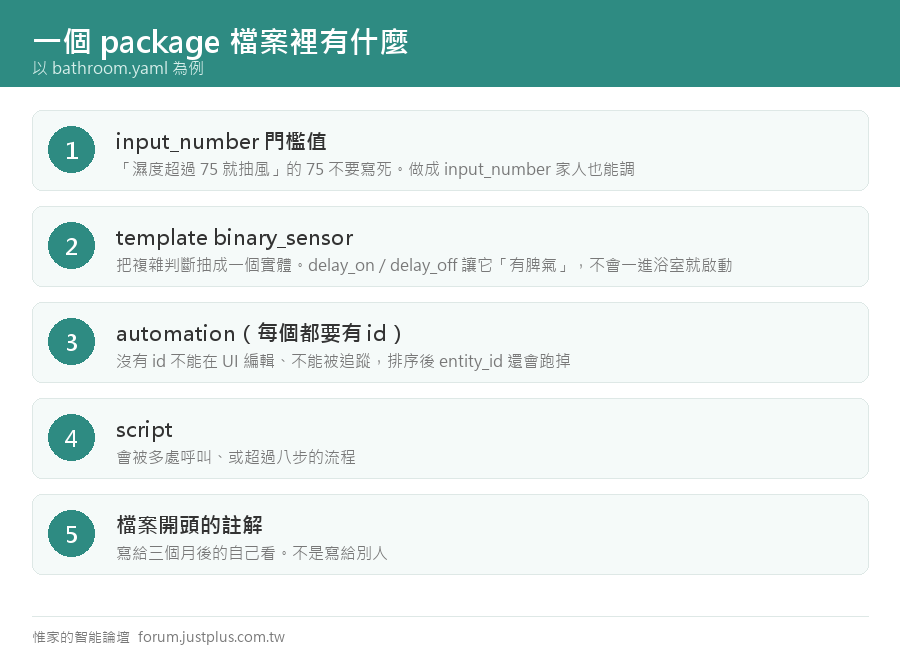
    沒有 id 的自動化不能在 UI 上編輯,也不能被追蹤。
    而且 id 一旦改了,那個自動化的歷史紀錄就斷了。

    命名規則:<區域>_<做什麼>,全小寫底線。

    2. 門檻值用 input_number,不寫死

    「濕度超過 75 就抽風」的 75 寫死在 YAML 裡,
    調的時候要改檔案、重載。做成 input_number 就能在介面上拉。

    而且家人也能調 —— 這比什麼都重要。

    3. template 的 delay_on / delay_off
    1.         delay_on: "00:02:00"
    2.         delay_off: "00:10:00"
    複製代碼

    洗澡時濕度會瞬間飆高,delay_on 兩分鐘避免一進去就啟動。
    delay_off 十分鐘避免抽到一半就停。

    這兩個參數讓感測器「有脾氣」,是我後來覺得最有用的小設定。

    4. 檔案開頭一定有註解

    三個月後打開這個檔案,你不會記得為什麼這樣寫。
    註解不是寫給別人看的,是寫給未來的自己看的。

    我的命名慣例


    • 檔案:小寫底線,底線開頭的是「系統級」(_system、_notify)
    • 實體 ID:英文,<區域>_<裝置>_<功能>
    • 自動化 id:英文,<區域>_<做什麼>
    • alias(顯示名):中文,給人看的
    • 輔助元件:英文 ID + 中文 name


    遷移的順序建議

    我當初一口氣全部搬,結果三個東西默默失效,花了兩天找。

    正確做法:一次搬一個功能,跑一週再搬下一個。

    順序建議:


    • 先搬最獨立的(例如某個房間)
    • 再搬跨房間的邏輯(通知、在家判斷)
    • 最後才搬系統設定(recorder、logger)


    每搬完一個就 git commit,出事可以精準回退。

    ---

    最後講一個心得:結構的價值在「半年後你還敢動它」。

    我第一年的設定是一坨兩千行的 configuration.yaml,
    到後來我完全不敢改,因為不知道會影響什麼。

    整理完之後,加一個新功能大概二十分鐘,而且不用擔心弄壞別的東西。
    您需要登入後纔可以回帖 登入 | 立即註冊

    本版積分規則

    Archiver|手機版|惟家的智能論壇

    GMT+8, 2026-9-24 13:17 , Processed in 0.083558 second(s), 24 queries .

    快速回覆 返回頂部 返回列表